
1、更新系统并安装v2ray
sudo apt update
sudo apt install -y curl unzip vim
执行官方FHS安装脚本
sudo bash -c "$(curl -L https://raw.githubusercontent.com/v2fly/fhs-install-v2ray/master/install-release.sh)"
确认服务是否存在
which v2ray
systemctl status v2ray
2、生成UUID
cat /proc/sys/kernel/random/uuid
假设生成的UUID为 11111111-2222-3333-4444-555555555555
3、写入服务端配置
sudo vim /usr/local/etc/v2ray/config.json
写入:
{
  "log": {
    "loglevel": "warning",
    "access": "/var/log/v2ray/access.log",
    "error": "/var/log/v2ray/error.log"
  },
  "inbounds": [
    {
      "port": 10086,
      "listen": "0.0.0.0",
      "protocol": "vmess",
      "settings": {
        "clients": [
          {
            "id": "11111111-2222-3333-4444-555555555555",
            "alterId": 0,
            "security": "auto"
          }
        ]
      },
      "streamSettings": {
        "network": "tcp"
      }
    }
  ],
  "outbounds": [
    {
      "protocol": "freedom",
      "settings": {}
    },
    {
      "protocol": "blackhole",
      "settings": {},
      "tag": "blocked"
    }
  ]
}
4、启动并设置开机自启
sudo systemctl daemon-reload
sudo systemctl enable v2ray
sudo systemctl restart v2ray
sudo systemctl status v2ray --no-pager
确认监听端口
sudo ss -lntp | grep 10086
5、放行防火墙
若有 ufw:
sudo ufw allow 10086/tcp
sudo ufw status
如果是 CentOS / Rocky / AlmaLinux:
sudo firewall-cmd --permanent --add-port=10086/tcp
sudo firewall-cmd --reload
sudo firewall-cmd --list-ports
接着别忘了配置服务商的安全组
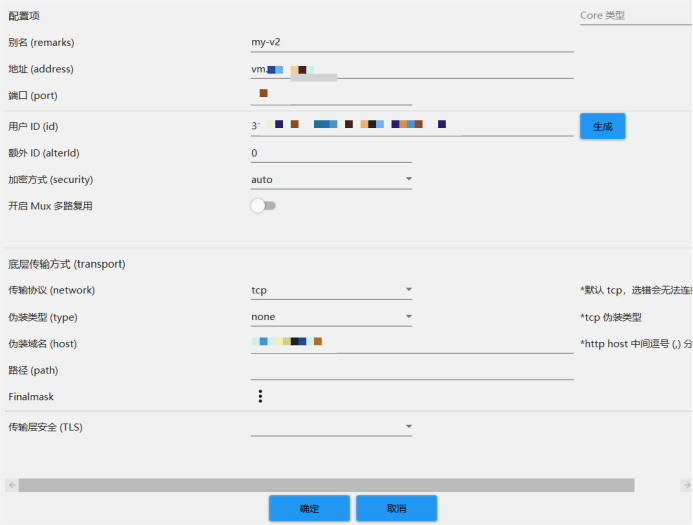
6、客户端填写节点参数
客户端中填写:
地址 / Address: 你的 Google Cloud 外部 IP
端口 / Port: 10086
用户 ID / UUID: 你生成的 UUID
额外 ID / alterId: 0
加密 / Security: auto
传输协议 / Network: tcp
TLS: none
伪装类型 / Type: none